The Desk: Rethinking How We Communicate What Matters
Overview
Imagine you thought of something that could be helpful for someone to consider. You know it is not proper to say it directly, because it will be forgotten. It would be better to explain the main parts in a formatted structure and leave it on their desk, where it is more understandable, easier to read, and easier to maintain.
That observation produced the Desk — one of four communication areas in the ComeFront platform, and a rethinking of how we send, organize and track actionable information.
We have tried to force all communication through the same channels: emails, messages, social posts. But different kinds of information need different structures to be understood, shared and acted on. The Desk embodies one principle: actionable items deserve their own dedicated space, designed for clarity, tracking and follow-through.
Instead of fleeting conversations or buried email threads, important items “land” on someone’s digital desk, where they stay visible until they are addressed.
Key Features
Three core categories
Information is organized into three distinct types:
- Tasks: specific actions that need completion.
- Improvements: suggestions for enhancement — deliberately named to reduce defensiveness compared with direct criticism.
- Others: general information items requiring consideration.
Structured information fields
Each item carries standardized fields that remove ambiguity:
- Title — concise summary
- Description — detailed explanation
- Type — task, improvement or other
- Receiver — who needs to see it
- Date, time and location — contextual information
- Expiration date — optional deadline for time-sensitive items
Interactive status tracking
Receivers update an item’s status in place and creators are notified automatically, closing the loop without an awkward follow-up:
- Nothing yet — acknowledged but not started
- On process — currently being worked on
- Done — completed
- Deleted — no longer relevant
Two layouts, one structure
On large screens, three vertical columns display Tasks, Improvements and Others side by side. Each category is color-coded with distinct borders, and items appear as clean, minimal cards inside scrollable lists.
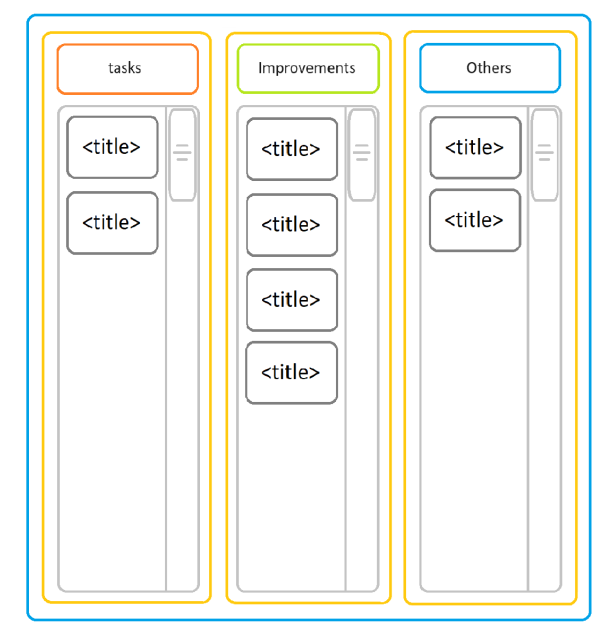
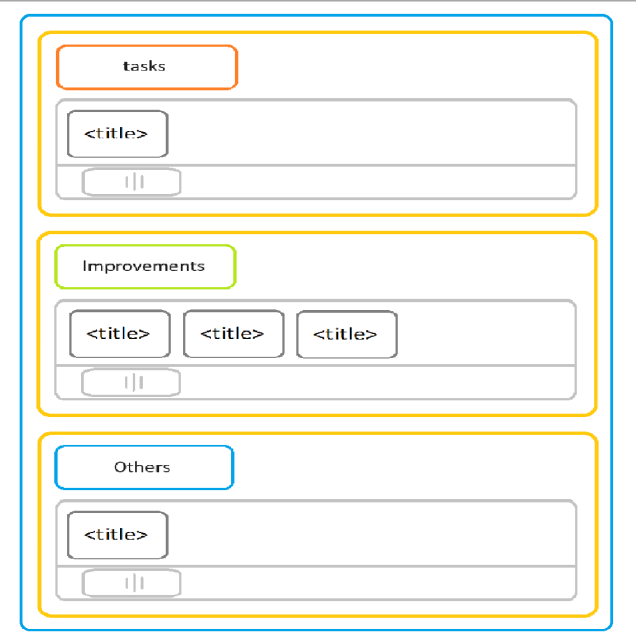
On small screens, categories stack vertically with tab-style selection and items scroll horizontally within each category — adapting to mobile interaction while preserving the organizational structure.
Patent & IP Status
The Desk is patent pending. It is covered by a provisional patent application for the system it belongs to, the Integrated Multi-Area Human Communication Facilitation System, with Parham Paziraie as inventor. What follows is what that application protects, in plain language.
The four-area architecture
The central claim is not the Desk on its own — it is the decision to split human communication into four purpose-built areas and run them as one platform:
- Desk: task and improvement management with status tracking
- Notice Board: multi-media information sharing and announcements
- Agreement: collaborative document creation and consensus-building
- World Peace: global issue discussion and solution proposals
Existing tools solve fragments of this. Integrating the four areas, so information can be routed to the structure that suits it, is the part that is claimed.
What is protected in the Desk
- Structured information transfer: standardized fields, category-based organization into Tasks, Improvements and Others, temporal and spatial context, and optional expiration dates — a template, not a text box.
- The status loop: four states the receiver can set, each one notifying the creator automatically. Both sides see progress without anyone chasing anyone.
- The desk paradigm: items land in a workspace and persist until they are addressed or dismissed, rather than scrolling away down a chronological inbox.
- Connection-gated sharing: items can only be sent between people who have established a connection, so a desk cannot be used to reach strangers.
- The interface itself: the color-coded category columns, the card layout, the status indicators, and the way the three-column desktop view restructures into stacked sections on a phone. The design files form part of the application.
- The end-to-end flow: registration, connection, item creation, sharing, receiver interaction, status update, automatic notification — claimed as one process, not as isolated features.
What is not claimed
The application does not claim to have invented task management, or messaging, or notifications. Each of those exists. What it claims is the specific combination: designated spaces per information type, standardized templates with defined fields, interactive status tracking with automatic notification in both directions, and the integration of all of it inside one connection-based platform.
Why the combination holds up
Against email: structured templates rather than free-form text, automatic status tracking rather than manual follow-ups, organization by type rather than chronological threading, persistent visibility rather than burial in an inbox.
Against project management tools: interpersonal focus rather than team hierarchy, lightweight structure rather than enterprise process, a social connection model rather than organizational constraints, multi-area integration rather than a single purpose.
Against messaging applications: formatted structured items rather than conversation streams, granular status tracking rather than a “seen” indicator, organization by category rather than by time, action-oriented rather than discussion-oriented.
The problems it sets out to solve
The application is built on twelve specific failures of existing communication tools: fragmented channels; task management with no integrated status tracking; unstructured sharing that causes miscommunication; the difficulty of making and keeping agreements; limited engagement with global issues; constant context switching between disconnected tools; no awareness of time, location or urgency; weak collaboration mechanisms; information overload from chronological-only organization; limited access to humanitarian discussion; inefficient knowledge retrieval; and inadequate progress tracking and accountability.
Impact
For senders
- Communicate thoughtfully without being pushy
- See whether items are being addressed
- Document important suggestions permanently
- Avoid awkward follow-up conversations
For receivers
- An organized workspace instead of a chaotic inbox
- Time to consider items at their own pace
- Clear structure that makes understanding easier
- Simple status updates that keep everyone informed
A real use case
Sara uses the Improvement type to share suggestions with her colleague James. Because the feedback arrives in a structured format rather than as a remark, James can focus on the content instead of feeling criticized — which leads to better implementation and a better working relationship.
The benefits
- Clarity: a structured format removes ambiguity
- Permanence: items stay visible until addressed
- Tracking: real-time status for all parties
- Organization: separate categories prevent overload
- Respect: recipients process in their own time
- Accountability: a clear record of what was suggested and what happened
- Reduced conflict: a non-confrontational way to give feedback
Looking forward
The Desk is a shift from treating all communication as equal to recognizing that different information needs different homes. It is one part of the ComeFront four-area system, where every type of human communication gets a structure designed for it.
When we stop forcing round pegs into square holes, forgotten conversations become documented actions, vague requests become clear tasks, and criticism becomes collaborative improvement. That is the promise of the Desk — and it is only the beginning.